BIO,NIO,AIO 对应三种不同的 IO 模型,本文将详细介绍这三种 IO 模型。
同步和异步
- 同步: 任务顺序执行,必须等前一个任务完成后才可以继续执行后面的任务
- 异步: 任务发起后,不用等待任务完成,可以忙其他的任务,当任务完成时,会主动进行通知
同步和异步主要的区别在于任务完成时是否有通知(回调)机制,如果没有所谓的通知(回调)机制,那就是同步的,如果有通知(回调)机制,那就是异步。不能够通过是否阻塞来判断是同步还是异步
代码示例
// 同步调用,readFile 方法执行时阻塞等待文件读完
String data = readFile("file.txt");
System.out.println("文件内容: " + data);
- 在
readFile没有读取完毕之前,程序不会往下执行
// 异步调用,方法立即返回
readFileAsync("file.txt", new Callback() {
    @Override
    void onComplete(String data) {
        System.out.println("文件内容: " + data);
    }
});

System.out.println("我不用等文件读完,先去干别的事");
readFileAsync调用后立即返回,不阻塞- 文件读取完毕后,调用
onComplete通知读取的结果
阻塞和非阻塞
阻塞与非阻塞指的是线程的状态。
- 阻塞: 指的是 I/O 操作的这段时间,线程处于阻塞状态,等待 I/O 操作完成后唤醒线程并继续往下执行
- 非阻塞: 指的是 I/O 操作的这段时间,线程处于非阻塞(运行态)状态。线程发起 I/O 操作,发现数据不可用时,立即返回,不等待, 继续向下执行。
代码示例
// 同步调用,readFile方法执行时阻塞等待文件读完
String data = readFile("file.txt"); // 阻塞等待 IO 完成
System.out.println("文件内容: " + data);
- 执行
readFile时,线程处于阻塞状态,等待 IO 完成
FileChannel fileChannel = FileChannel.open(path, StandardOpenOption.READ);
ByteBuffer buffer = ByteBuffer.allocate(1024);

// 不阻塞,直接向下执行
int bytesRead = fileChannel.read(buffer);

// 由于没有回调(通知)机制,只能够不断的轮询
while (bytesRead != -1) {
	buffer.flip();
	System.out.println("读取的内容: " + StandardCharsets.UTF_8.decode(buffer));
	buffer.clear();
	bytesRead = fileChannel.read(buffer);
}

fileChannel.close();
- 执行
read方法的时候,如果没有数据,直接返回0,不阻塞等待 - 因为没有回调(通知)机制,只能够通过
while循环来判断 IO 操作是否完成
BIO
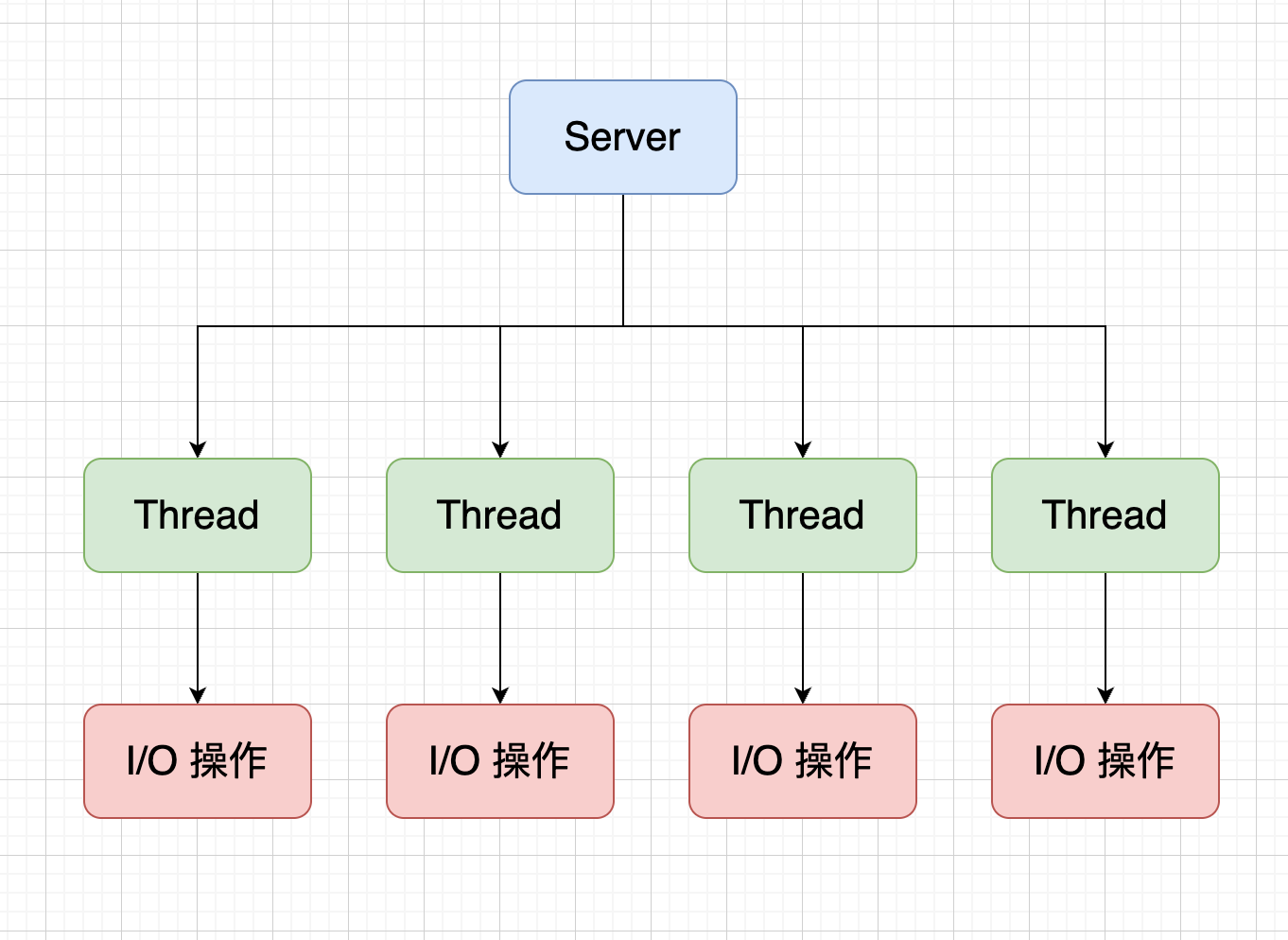
Blocking I/O(BIO),是一种同步阻塞的 IO 模型。线程执行 IO 操作时会进入阻塞状态,直到 IO 操作完成时,被唤醒再继续往下执行。线程与 IO 操作的关系是一对一,也就是一个线程对应一个 IO 操作
代码示例
import java.io.FileInputStream;
import java.io.IOException;

public class BioFileReadExample {
    public static void main(String[] args) {
        String filePath = "test-bio.txt";

        try (FileInputStream fis = new FileInputStream(filePath)) {
            byte[] buffer = new byte[1024];
            int bytesRead;

            // 阻塞式读取,read()会阻塞直到有数据或文件结束
            while ((bytesRead = fis.read(buffer)) != -1) {
                String content = new String(buffer, 0, bytesRead, "UTF-8");
                System.out.print(content);
            }
        } catch (IOException e) {
            e.printStackTrace();
        }
    }
}
NIO
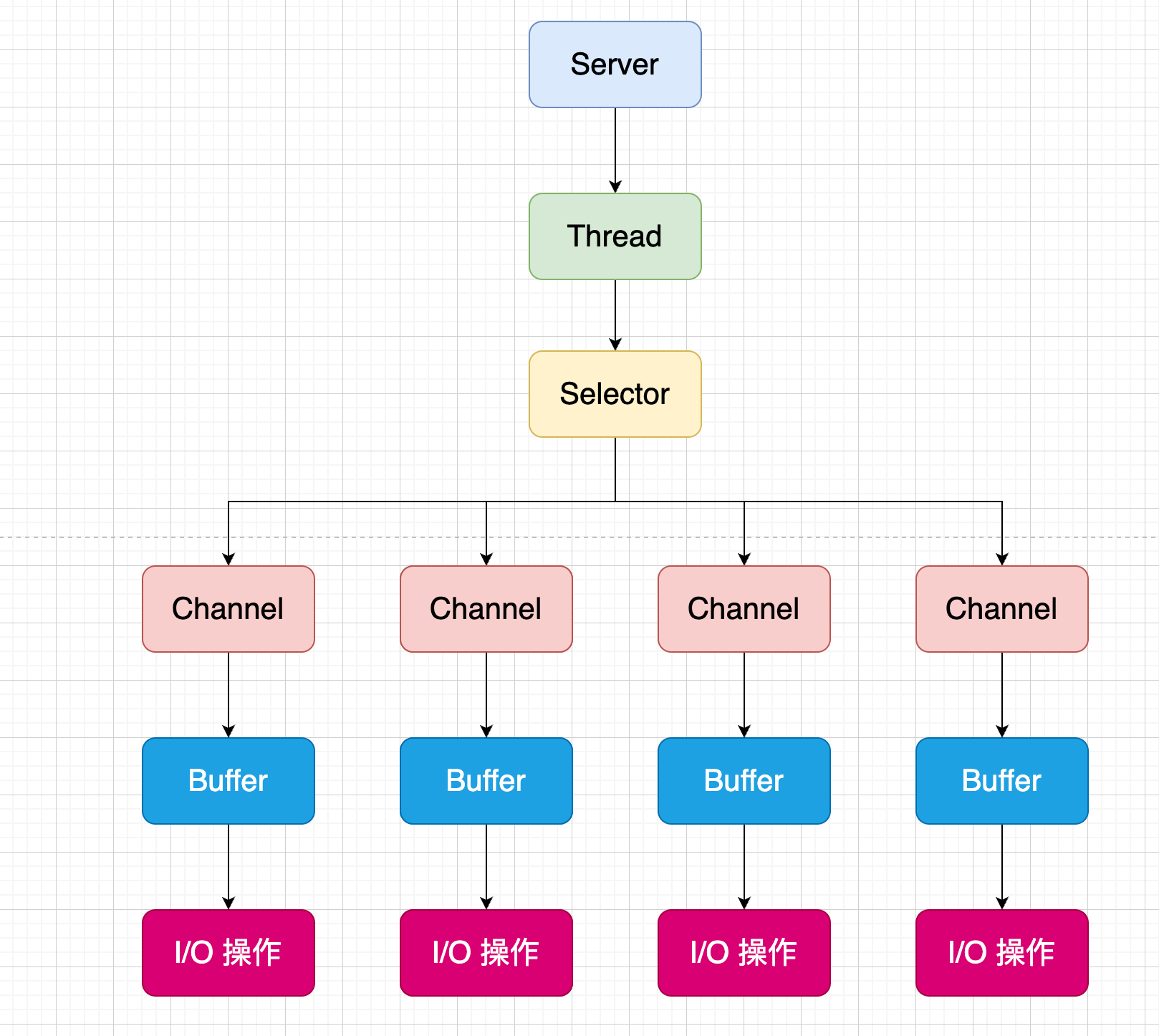
Non-Blocking I/O(NIO), 是一种同步非阻塞的 IO 模型。线程发起 IO 操作后,不会进入阻塞状态等待 IO 操作的完成,而是直接往下继续执行。线程与 IO 操作的关系是一对多,也就是一个线程可以管理多个 IO 操作。
NIO 相较于 BIO 多了一个选择器(Selector)组件,由选择器来管理多个 IO 操作,线程直接与选择器进行对话。
代码示例
// NIO 服务器示例,非阻塞IO,单线程可同时处理多个连接
ServerSocketChannel serverChannel = ServerSocketChannel.open();
serverChannel.bind(new InetSocketAddress(8080));
serverChannel.configureBlocking(false);  // 非阻塞模式

Selector selector = Selector.open();
serverChannel.register(selector, SelectionKey.OP_ACCEPT);

while (true) {
    selector.select();  // 阻塞,等待某个通道准备好事件(连接读写等)

    Set<SelectionKey> selectedKeys = selector.selectedKeys();
    Iterator<SelectionKey> iter = selectedKeys.iterator();

    while (iter.hasNext()) {
        SelectionKey key = iter.next();
        iter.remove();

        if (key.isAcceptable()) {  // 有新连接
            ServerSocketChannel ssc = (ServerSocketChannel) key.channel();
            SocketChannel clientChannel = ssc.accept();
            clientChannel.configureBlocking(false);
            clientChannel.register(selector, SelectionKey.OP_READ);
            System.out.println("Accepted new connection");
        } else if (key.isReadable()) {  // 有数据读
            SocketChannel clientChannel = (SocketChannel) key.channel();
            ByteBuffer buffer = ByteBuffer.allocate(1024);
            int bytesRead = clientChannel.read(buffer);
            if (bytesRead == -1) {
                clientChannel.close();
            } else {
                buffer.flip();
                byte[] data = new byte[buffer.limit()];
                buffer.get(data);
                System.out.println("Received: " + new String(data));
            }
        }
    }
}
AIO
Asynchronous I/O(AIO), 是一种异步非阻塞的 IO 模型。线程发起 IO 操作后,不会等待 IO 操作的完成,而是继续往下执行,但是当 IO 操作完成后,会主动通知线程 IO 操作完毕。相较于 NIO 模型,加上了一个主动通知的功能,避免了轮训带来的性能损耗。
代码示例
import java.nio.ByteBuffer;
import java.nio.channels.AsynchronousFileChannel;
import java.nio.channels.CompletionHandler;
import java.nio.file.Path;
import java.nio.file.StandardOpenOption;
import java.nio.charset.StandardCharsets;
import java.io.IOException;
import java.util.concurrent.CountDownLatch;

public class AioFileExample {

    public static void main(String[] args) throws Exception {
        String filePath = "test-aio.txt";

        // 计数器,等待异步操作完成
        CountDownLatch latch = new CountDownLatch(2);

        // 异步写入示例
        asynchronousWrite(filePath, "Hello AIO World!\n", latch);

        // 等待写入完成,再开始读取(简化处理,实际可用回调链式调用)
        latch.await();

        // 重置计数器用于读取
        latch = new CountDownLatch(1);

        // 异步读取示例
        asynchronousRead(filePath, latch);

        // 等待读取完成
        latch.await();

        System.out.println("所有异步操作完成");
    }

    // 异步写入文件
    public static void asynchronousWrite(String filePath, String content, CountDownLatch latch) throws IOException {
        AsynchronousFileChannel fileChannel = AsynchronousFileChannel.open(
                Path.of(filePath),
                StandardOpenOption.WRITE, StandardOpenOption.CREATE);

        ByteBuffer buffer = ByteBuffer.wrap(content.getBytes(StandardCharsets.UTF_8));

        // 异步写,写完调用回调
        fileChannel.write(buffer, 0, null, new CompletionHandler<Integer, Void>() {
            @Override
            public void completed(Integer result, Void attachment) {
                System.out.println("写入完成,字节数: " + result);
                try {
                    fileChannel.close();
                } catch (IOException e) {
                    e.printStackTrace();
                }
                latch.countDown();  // 计数减1,表示写入完成
            }

            @Override
            public void failed(Throwable exc, Void attachment) {
                System.err.println("写入失败: " + exc);
                latch.countDown();
                try {
                    fileChannel.close();
                } catch (IOException e) { e.printStackTrace();}
            }
        });
    }

    // 异步读取文件
    public static void asynchronousRead(String filePath, CountDownLatch latch) throws IOException {
        AsynchronousFileChannel fileChannel = AsynchronousFileChannel.open(
                Path.of(filePath),
                StandardOpenOption.READ);

        ByteBuffer buffer = ByteBuffer.allocate(1024);

        // 异步读,读完调用回调
        fileChannel.read(buffer, 0, buffer, new CompletionHandler<Integer, ByteBuffer>() {
            @Override
            public void completed(Integer result, ByteBuffer attachment) {
                System.out.println("读取完成,字节数: " + result);
                attachment.flip();
                byte[] data = new byte[attachment.limit()];
                attachment.get(data);

                String content = new String(data, StandardCharsets.UTF_8);
                System.out.println("文件内容: \n" + content);
                try {
                    fileChannel.close();
                } catch (IOException e) {
                    e.printStackTrace();
                }
                latch.countDown();  // 计数减1,表示读取完成
            }

            @Override
            public void failed(Throwable exc, ByteBuffer attachment) {
                System.err.println("读取失败: " + exc);
                latch.countDown();
                try {
                    fileChannel.close();
                } catch (IOException e) {
                    e.printStackTrace();
                }
            }
        });
    }
}